In this story
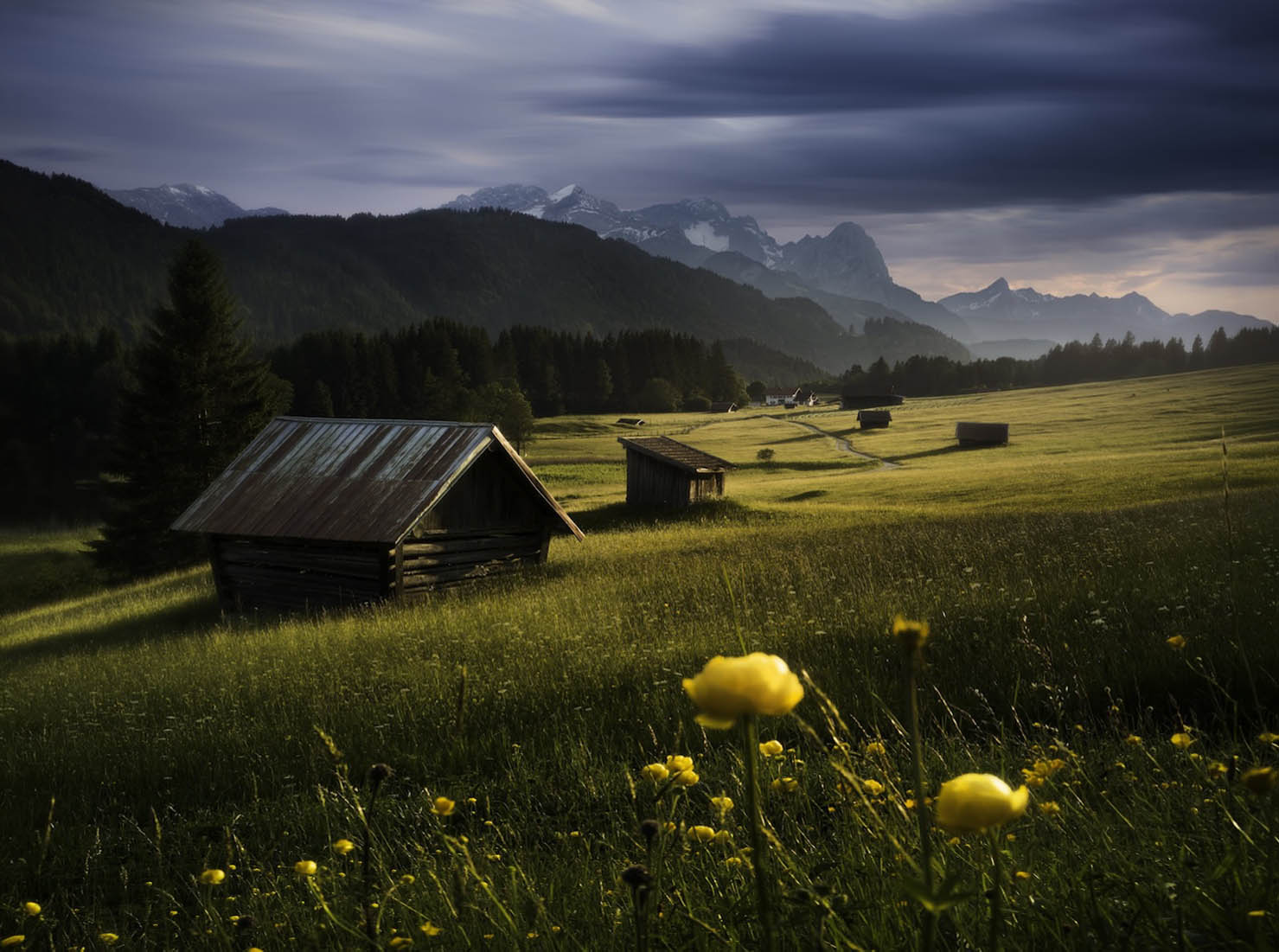
This photograph contains a small lie that takes a moment to see. The foreground is in shadow. The wooden hay barns aren't. The distant peaks aren't either. From where you stand as the photographer, edge of a meadow at the western shore of a small lake, the sun went behind a ridge maybe five minutes ago. From where the barns are sitting, four hundred metres southwest across the water, the same sun is still well above the local horizon, hitting the wood from west-northwest.
Two locations, two different terrain horizons, two different versions of "is the sun out?". Most weather apps think you and your subject are the same point. They aren't, and the difference is where most of landscape photography lives.
Two features new in Inverza 1.4, Set Subject and the Photographer/Subject toggle in the Horizon Paths chart, are built around exactly this asymmetry.
Set Subject: telling the app what you're aiming at

When you save a photo spot, Inverza knows where you stand. That's enough for general weather and a sunrise time. It is not enough to predict the light on what you're aiming the camera at, because the subject can be anywhere from a few hundred metres to fifty kilometres away, far enough to have a completely different terrain horizon.
The Set Subject button in the spot's action grid opens a small map picker. Pan it so the blue pin lands on what you're actually photographing: a peak, a barn, a lake, a lighthouse. Fifty kilometres is a permissive cap on purpose. With a 600 mm lens, alpine telephoto work occasionally reaches that far for a distant peak.
Behind the scenes, Inverza then quietly queries OpenStreetMap to classify what's at that pin: one of 22 kinds (peak, glacier, waterfall, alpine hut, castle, lake, lighthouse, and so on). That classification flows into the AI chat's system prompt with a per-kind photographic playbook ("alpine hut: warm wood pairs with cool surroundings, glows in low side-light against snow", "glacier: oblique rake-light reveals crevasse texture, alpenglow at the top edge"). The AI now knows what it's looking at, not just where.
In this example: photographer on the meadow's edge, subject is a cluster of wooden hay barns 405 m southwest, bearing 244°. OSM tags it as building=hut → "alpine hut".
Two views, same minute
Once a subject is set, the Horizon Paths chart picks up a small toggle in its legend. Camera icon for the photographer's view, tree icon for the subject's view. The chart's terrain silhouette, sun arc, moon arc, and current-position dots all re-compute for whichever perspective you tap. Same time, same day, completely different terrain.
Here are both views at the same minute, 19:53 on May 23rd:


That difference between the two dots is the entire premise of the photograph above. Local terrain has clipped the sun for the photographer; the subject's slightly different ground gives it another five or ten minutes of direct light. You stand in shadow and watch warm light reach exactly where you want it.
Decoding the light angle
Quick math, because the chart isn't decorative. The photographer is facing west (~270°). The subject sits at bearing 244°. The sun is coming in from the WNW, around 290°. From there:
- The sun's bearing relative to the photographer's view axis is roughly 20° to the right of the lens, so the sun isn't in frame, it's grazing in from camera-right.
- The sun's bearing relative to the line from photographer to subject is roughly 46° from behind-and-to-the-side: backlight with a strong side-light component.
In photographic terms: the subject is back-side-lit, with the warm low-angle light catching the camera-facing flank of the wooden barns at a glancing angle. That's the classic rim-and-graze configuration that picks out the texture of the wood, edge-lights the roofline against the darker meadow behind, and leaves the front face of the barn in soft fill. Exactly what you see in the hero photo.
You don't have to do this math while you're out shooting. Inverza's AI chat does it for you. The point of doing it here is that the Horizon Paths chart is telling you something physically real.
When the asymmetry matters most
Three setups where Set Subject plus the Horizon Paths toggle change the call:
- Alpine landscape. Photographer in a valley or at a meadow edge; subject is a peak across the valley. The local western ridge typically clips the sun for the photographer ten to fifteen minutes before the peak loses light. That window is alpenglow.
- Coastal. Photographer on one headland, subject (a lighthouse, an arch, an island) on another. Each headland has its own terrain horizon. The lighthouse can stay lit while you're in shadow (or the opposite), and there is no way to predict it from astronomical sunset times alone.
- Shooting out of the forest. Photographer at the edge of trees, subject in the open. Trees obstruct your western horizon; nothing obstructs the subject. The subject can stay lit twenty minutes longer than you'd plan for from astronomical times.
What the AI does with this
When a subject is set, the AI chat is fed the subject's terrain-illumination intervals separately from the photographer's. Ask "is golden hour going to work tomorrow?" and the model now reasons about the light on the subject (when the subject is sunlit, when its camera-facing flank is lit during the golden-hour sun-angle window), instead of pointing you at the astronomical sunrise time, which may bear no resemblance to what your terrain is doing.
For subjects more than 20 km away, Inverza also pulls a second weather forecast for the subject's coordinates and threads it into the chat context. This matters most for the painful case: the valley forecast looks clear, you've driven 90 minutes for the alpenglow, and a cloud cap is sitting on the peak you came for. Inverza compares cloud cover at both points (low, mid, and high bands, plus a 6-hour trend at the subject's coordinates) and flags the divergence in the AI chat, so the model can warn you when the peak looks cloud-bound while your valley reads clear. The opposite case (you in cloud, peak in the clear) is rarer but works the same way: a textbook spotlight condition that's invisible to any single-point forecast.
How to set it up
In Inverza 1.4 or later:
- Open the map and tap a saved spot.
- Tap Set Subject in the 2×2 button grid below the conditions.
- Pan the small map so the blue pin sits on what you're photographing. Save.
- Tap Horizon Paths. Use the camera ↔ tree toggle in the legend to flip between your view and your subject's.
The chart will tell you when your subject is lit. The AI chat will plan around it. And the next time you find yourself standing in shadow watching the warm light reach the barn across the lake, that's the feature working.
