In this story
On the first of November, 1941, Ansel Adams was driving south through the Chama Valley after a frustrating day of not making photographs. He glanced left, saw a low moon over the village of Hernandez, and did the fastest setup of his life: car onto the shoulder, 8x10 out, one sheet exposed with no meter reading, the exposure computed in his head from the remembered luminance of the moon. Moments later the sunlight left the crosses in the foreground and the photograph, the one now known as Moonrise, Hernandez, was already history.
Here is the part of the story that gets less attention. Adams himself could never remember exactly when he took it; he dated it anywhere from 1940 to 1944 over the years. It took until 1991 for an astronomer to settle the matter, working backwards from the position of the moon in the frame to recover the date and the minute of exposure, half a century after the shutter closed.
Which means the geometry of the most famous ninety seconds in landscape photography was knowable the whole time. The moon's position over that ridge, at that minute, was pure celestial mechanics. Adams just did not have it in his pocket.
We made a film about exactly this
Our short film Stealing Moonrise follows Nigel, a time-travelling photographer, as he arrives in Hernandez about an hour before Adams does, with one goal: take the world's most famous photograph first. The film is made entirely with AI video tools and labelled as such; it is a story about photography, not a claim to footage of 1941. What Nigel has that Adams did not is the geometry in advance: he knows the minute the moon will hang where he needs it, and he knows what his frame will contain before the light arrives.
Stealing Moonrise. If the player does not load, watch it on YouTube.
The tools Nigel uses in the film are the ones in Inverza today, and this post is about the workflow they form together. It has two halves, because an exact composition is really two separate questions answered in two separate places.
Question one, from anywhere: when does the sky line up?
The first question is pure geometry: at what minute does the moon (or the sun, or the galactic core) stand exactly where the composition needs it, relative to the real terrain of the spot? Not the flat astronomical horizon, the actual one, with a ridge on it.
That is what Horizon Paths answers, and you can answer it from your sofa, for a spot three hundred kilometres away, weeks before you go. Save a spot anywhere on the map and open Horizon Paths: Inverza computes the terrain silhouette for that exact point from elevation data and draws the sun's and moon's arcs across it. You can read off the minute the moon clears the ridge, where along the horizon it happens, and, crucially for a Moonrise-style photograph, what the sun is doing at that same minute.
Because Moonrise is secretly a two-body problem. The moon rising in the east is only half the picture; the other half is the low western sun still raking light across the foreground. The photograph lives in the overlap window where both are true, and that window is short. In Hernandez in 1941 it was minutes long, and Adams caught the end of it. Horizon Paths shows you both arcs against the same terrain, so the overlap window stops being luck and becomes a time you can put in your calendar.
If your foreground and your camera position have meaningfully different horizons, the Photographer/Subject toggle handles that asymmetry too: light on the subject and light at your feet are different events, and you can plan around either.
Question two, at the spot: does the frame work from here?
Geometry gets you to the right place at the right time. It does not tell you whether the picture works from the exact two square metres where your tripod stands. Thirty metres left or right changes what the moon rises behind; a focal length changes whether the moon is an accent or the subject. This second question can only be answered standing in the field, and until recently the answer arrived at the same moment as the event, which is exactly too late.
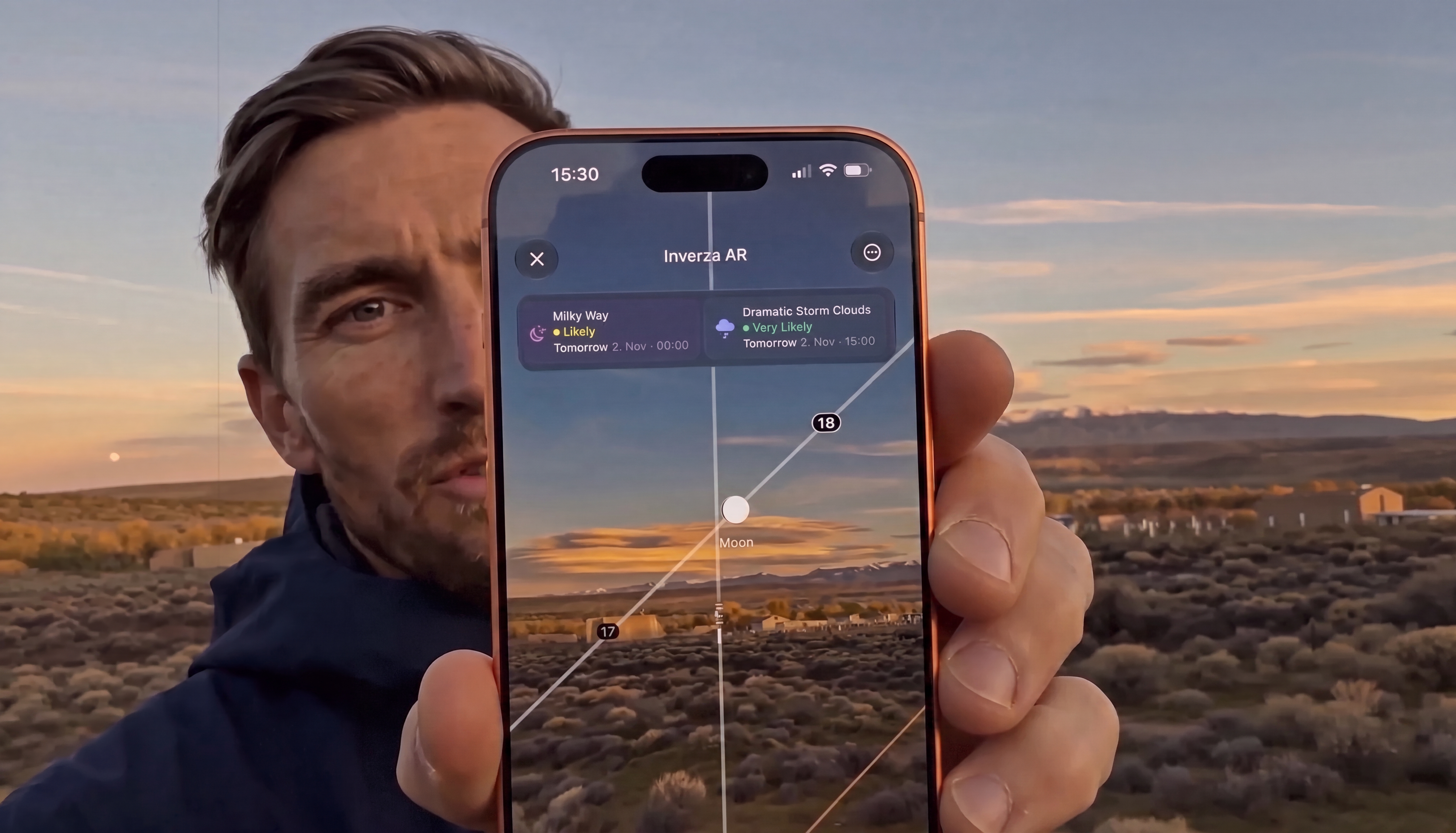
That is what the new AR Sky view is for. Point your phone at the scene and it draws the sun, the moon, and the Milky Way onto the live camera feed, anchored with ARKit to where they actually are and will be for your location. Then two controls turn it into a composition tool:
- The time scrubber. Drag, and time runs forward. Set it to the minute Horizon Paths gave you, and the moon marker hangs in the live view exactly where the moon will be. Now walk. Move until the marker sits precisely where the composition wants it, over the chapel, in the notch between the peaks, clear of the power line you did not see on the map.
- Lens switching by focal length. Flip between your phone's lenses and you are previewing different crops of the same scene, a live stand-in for the framing decision you will make on the real camera. The moon over a ridge is a different photograph at 24mm than at 77mm, and AR Sky lets you audition both before anything happens in the sky.
Plant the tripod, frame, focus while there is light to focus by, and wait for the sky to catch up with the preview. We walked through the astrophotography version of this in Composing the Milky Way before you can see it; the moon workflow is the same idea with a brighter subject. The same honest caveat applies too: phone compasses drift a degree or two near metal, so treat the overlay as "the moon will track through this gap" and use the Calibrate control if the markers look rotated.
The Moonrise workflow, start to finish
- Drop a spot on the location, from home.
- Open Horizon Paths. Find the day and minute your subject clears the terrain where you need it, and check the overlap: what is the sun doing at that minute? Is the foreground still lit?
- Check the conditions. Closer to the date, let the condition detectors tell you whether the sky itself will cooperate: clouds on the eastern horizon can cancel a moonrise that the geometry promised.
- Arrive early and open AR Sky. Scrub to the planned minute, walk until the marker sits where the composition wants it, choose the focal length, plant the tripod.
- Wait. This is the good part. The planning is done, so your whole attention is free for the light.
In the film, Nigel does all of this with an hour to spare, which is the whole joke: the shot that required Adams' forty years of internalised craft, compressed into a few taps. But the serious point underneath is one Adams would have recognised instantly. He got Moonrise because decades of preparation left his hands free to act in ninety seconds. Planning tools do not replace that kind of readiness; they buy you more of the thing it was for. When the geometry is solved in advance, you stand there unhurried, watching the light do what you already knew it would, and you are free to notice the thing no app can forecast.
The moon is on time. You can be too.
